 Português
 English
 Español
Before the feed, the Word.
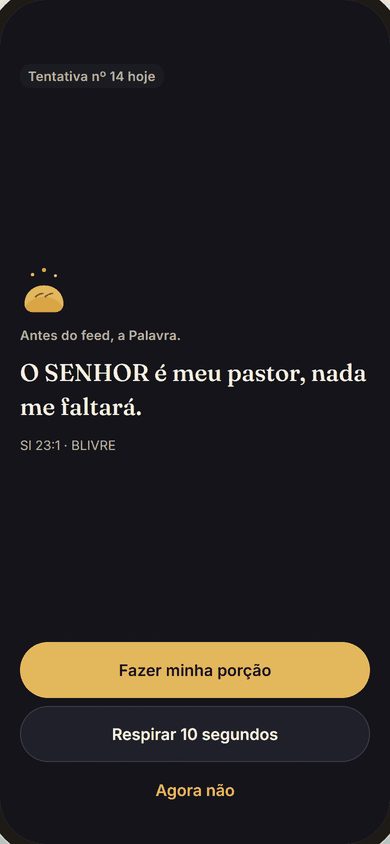
When you try to open Instagram, TikTok or YouTube, Manna’s Shield asks for your Daily Bread first: breathe, read and pray for 2, 5 or 10 minutes. Then the app is free for a while.


Coming soon to the App Store and Google Play.
Free for 3 days on the Annual and Monthly plans. The app reminds you before the first charge.
- For Catholics and evangelicals
- Your screen time stays on your phone
- No ads
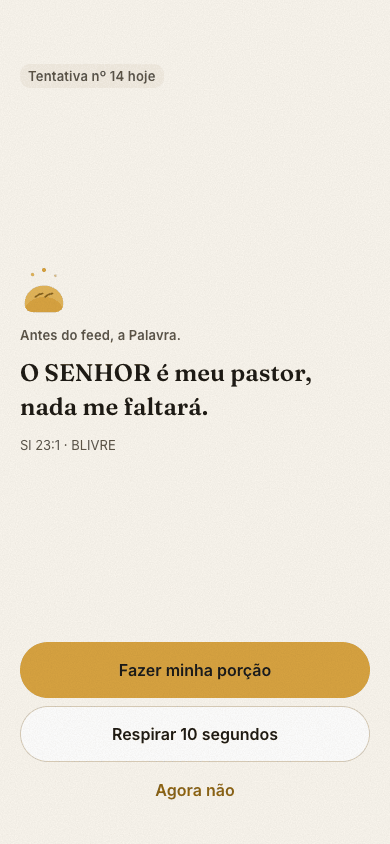
Your phone gets there before your prayer.
You wake up, reach for your phone, and the feed is already open. It isn’t a lack of faith. It’s a habit that repeats without asking: in the morning, on a break, before bed.
Habits change more easily with a pause in the right place than with willpower. Manna puts that pause exactly where the habit starts: the tap that would open the feed.
Three steps, every day
Set it up once. Shield takes care of the rest.
-
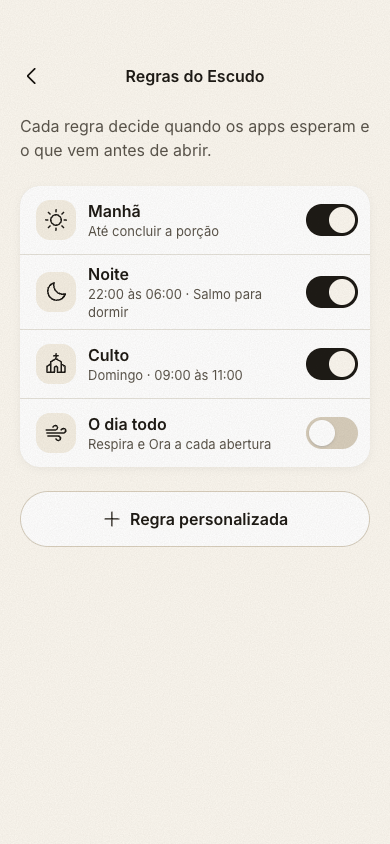
Choose apps and times
Instagram, TikTok, YouTube or anything you like, with the Morning, Night, Church Mode or All day rules.
-
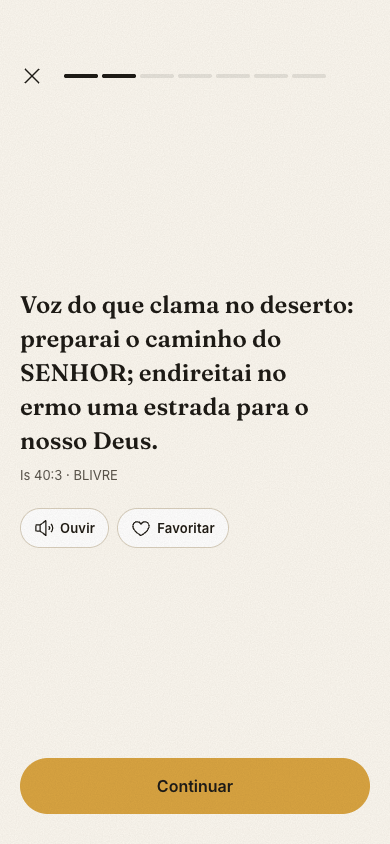
Take your Daily Bread first
When you try to open a protected app, Manna invites you to breathe, read a verse and pray. It takes 2, 5 or 10 minutes.
-
Go on in peace
After your Daily Bread, your apps are free for a while. If it’s urgent, “I need it now” opens them right away, no challenge.
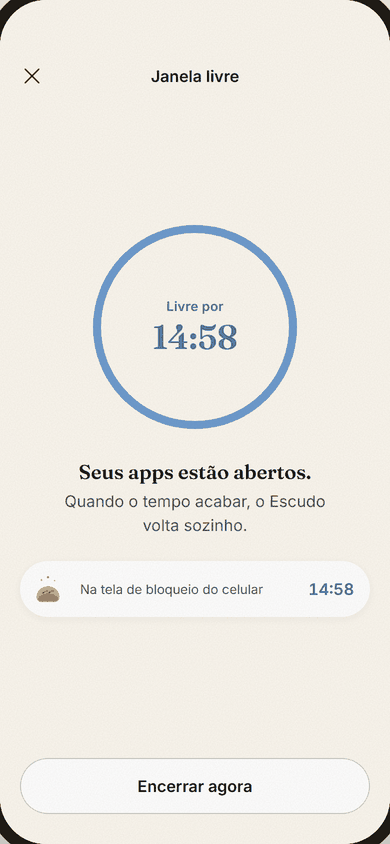


On iPhone, the invitation appears on the system’s own block screen. On Android, Manna shows its own screen.
What’s inside Manna
Screens from the app, from Shield to prayer.
-
Before the feed, the Word.
Shield pauses social media and invites you to your Daily Bread. At night, the screen turns dark.
-
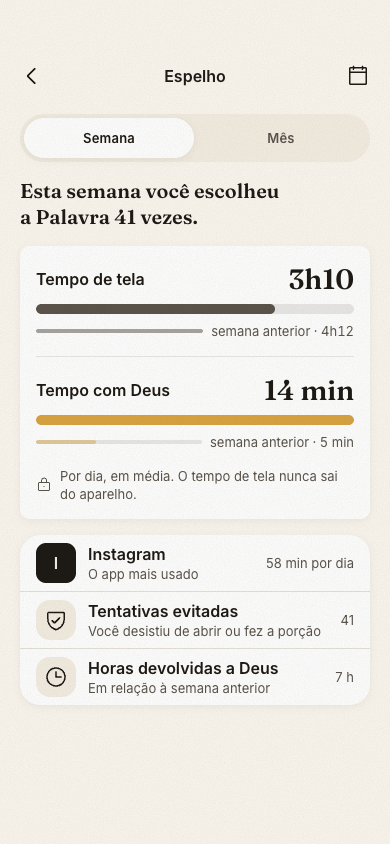
See screen time × Time with God.
Mirror shows both side by side, without pressure.
-
2, 5 or 10 minutes a day.
A verse, a reflection and a prayer that fit your day.
-
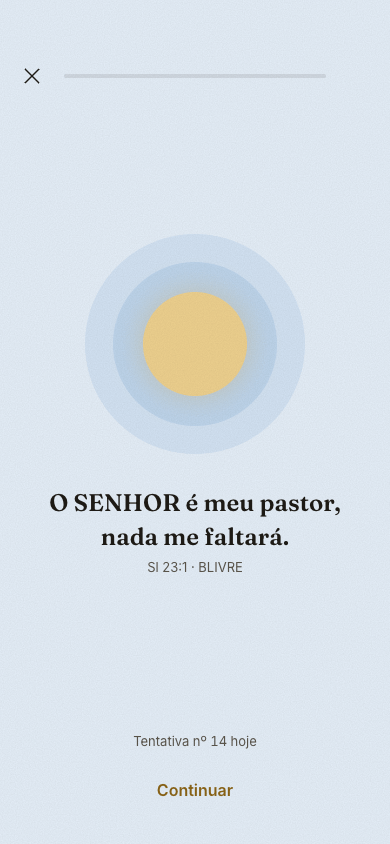
Breathe before you scroll.
Breathe & Pray calms the urge before you go on.
-
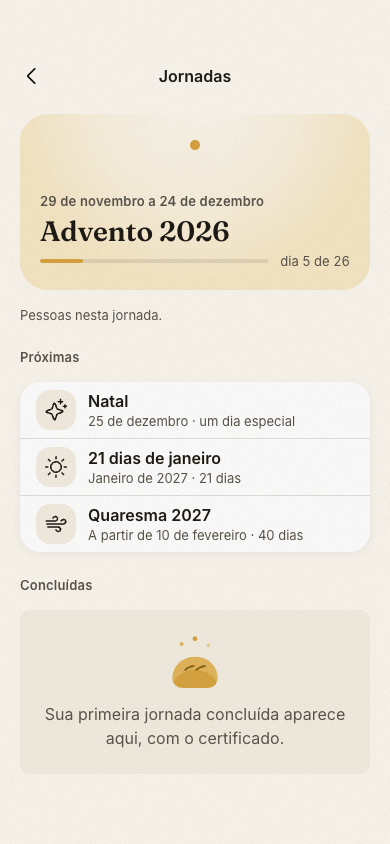
Walk through Advent together.
Journeys through the Christian calendar, with a count of everyone walking with you.
-
Catholic or evangelical: made for your faith.
Prayers, the rosary and ways to pray that follow your tradition.
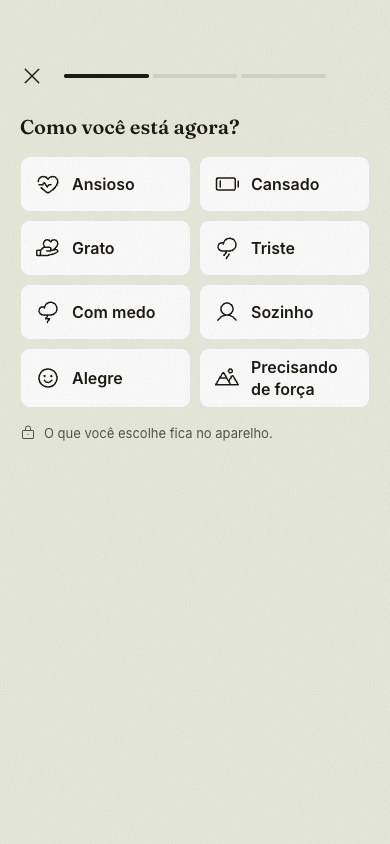


Screens come from the app prototype in Portuguese; the app itself is available in English.
Your screen time, side by side with your Time with God.
Every week, Mirror shows both numbers without judgment: where your time went, and how much of it came back to the Word. When your Time with God grows, you see it. When it doesn’t, you begin again.
Screen time numbers never leave your phone.
Be still, and know that I am God.
Journey of the season
Advent 2026: 26 days to Christmas.
From November 29 to December 24, one Daily Bread a day prepares your heart for Christmas. Everyone on Manna walks through the same reading, and the global counter shows how many people are on the journey with you.
Next come Christmas, 21 days of January and Lent.
Catholic or evangelical: made for your faith.
When you start, you choose your tradition or prefer not to say. Manna adapts prayers and the calendar, and only keeps that choice with your consent.
Launch Bibles: Bíblia Livre (BLIVRE) in Portuguese, World English Bible Updated (WEB) in English and Reina-Valera 1909 (RV1909) in Spanish.
The rosary with the mysteries of the day, the Angelus and the liturgical calendar.

Prayer, Psalms and a daily devotional, with ways to pray like ACTS and the Lord’s Prayer line by line.

What’s personal stays on your phone.
Manna is designed to need very little. Here is what stays and what leaves.
Stays on your device
- Your screen time
- The names of the apps you protect
- Your notes, highlights and prayer requests
- What you choose in “How are you right now?”
Goes to our server
- Your account and subscription
- Shield totals: attempts, completions and emergency unlocks
- Your tradition, only if you consent
No ads. This site uses no cookies or analytics.Read the privacy policy
Try it for 3 days. Keep going if it helps.
You get to know Manna, take your first Daily Bread, and only then choose a plan. The store shows the price in your currency before you confirm.
-
Annual
RecommendedFree for 3 days, then billed yearly.
-
Monthly
Free for 3 days, then billed monthly.
-
Lifetime
One payment, no free trial.
Local price in the storeEvery plan includes Shield, Daily Bread, Mirror, Journeys, the Bible and Prayer.
How the 3-day trial works
Today
You start with full access. Nothing is charged.
Day 2
Manna reminds you by notification and email: your subscription starts tomorrow.
Day 3
The trial ends. If you don’t cancel, your subscription starts on the plan you chose.
Cancelling takes two taps in App Store Settings or Google Play. Deleting the app does not cancel the subscription. If your subscription ends, Shield turns off: Manna never locks you out of your own apps.
Coming soon to the App Store and Google Play.
Frequently asked questions
How does Shield work?
You choose apps and times. When you try to open a protected app, Manna invites you to a 2, 5 or 10 minute Daily Bread. Then the app is free for a while.
Does it work on iPhone and Android?
Yes. On iPhone, the block uses the system’s own screen, with the invitation to your Daily Bread. On Android, Manna shows its own block screen, with the verse.
What if I urgently need an app?
Use “I need it now”: the app opens right away, with no challenge and no wait. It’s simply recorded in your Shield.
Will I be charged without noticing?
No. The store shows the price before you confirm, and Manna reminds you on day 2 of the trial, by notification and email. To avoid being charged, cancel before the 3 days end.
How do I cancel?
In App Store Settings or Google Play, under Subscriptions. Deleting the app does not cancel the subscription.
What happens if my subscription ends?
Shield turns off and your apps go back to normal. Your streak and your Mirror are kept for when you come back.
Do I need an account?
Yes. You create it at the start, before the free trial, so your subscription is kept safe.
Does my data leave my phone?
Your screen time, the names of protected apps, your notes and prayer requests stay on your device. The server receives only totals: attempts, completions and emergency unlocks.
Which Bible translations are available?
Bíblia Livre (BLIVRE) in Portuguese, World English Bible Updated (WEB) in English and Reina-Valera 1909 (RV1909) in Spanish.
Which languages are supported?
Portuguese, English and Spanish.

Pray first. Scroll later.
Start tomorrow morning with your Daily Bread, before any notification.
Coming soon to the App Store and Google Play.
Free for 3 days on the Annual and Monthly plans.
Bible text: Bíblia Livre (BLIVRE), CC BY 4.0 Brazil. World English Bible Updated (WEB) and Reina-Valera 1909 (RV1909): public domain.
Contact
Email us at lucas@jadorastudio.com. There's no form or chat: all contact (support, privacy, account deletion, press and partnerships) goes through this email.